Augment your existing team
Give your developers room to focus. Hand off a defined backlog, an integration or modernization work they cannot get to, with clear ownership and coordination with your team.
Senior-led software development for businesses running C#/VB.NET applications, SQL-heavy workflows and disconnected ERP systems. Get practical improvements, reliable systems and an accountable engineer who understands your business.
Discuss your application →
When the backlog grows or an important application needs attention, bring in experienced help that works with your existing systems and people.
Give your developers room to focus. Hand off a defined backlog, an integration or modernization work they cannot get to, with clear ownership and coordination with your team.
Get ongoing development and maintenance when a full internal team does not fit your business. Work directly with a senior engineer to keep your application reliable and improve it as your needs change.

Slow queries, unreliable reports and manual reconciliation hold teams back. Put over 20 years of database experience to work improving SQL Server performance and the workflows that depend on it.
Maintain the Access tools your business relies on, improve data quality and plan a practical migration when your workflows outgrow them.

Extend and maintain the .NET applications your team uses every day. Turn business requirements into practical web applications, workflow improvements and maintainable code.
Improve aging applications in manageable steps. Assess dependencies, reduce technical debt and modernize the parts that matter while protecting existing business workflows.
Plan and deliver cloud improvements in Azure or AWS where they fit your application, operational needs and budget.

Support and improve desktop applications that keep daily operations running, from data entry and tracking to reporting and specialized workflows.
Connect your ERP, business applications and external partners. Reduce duplicate entry, manual CSV transfers and disconnected processes with integrations built around your operations.
Start with a plan, deliver one valuable improvement, or build an ongoing partnership.
Review architecture, dependencies, technical debt and delivery bottlenecks.
The outcome: a prioritized improvement plan through a paid, fixed-scope engagement.
Complete one valuable integration, workflow improvement or focused modernization project.
The outcome: an agreed deliverable with clear acceptance criteria, tests and documentation.
Maintain a prioritized backlog with agreed delivery capacity, regular releases and progress reporting.
Clear expectations: support hours, incident handling, concurrent work and exclusions are agreed in advance.
Fixed fees for well-defined work. Monthly retainers for reserved capacity. Hourly discovery when the scope needs investigation.
AI helps accelerate delivery where appropriate. Jonathan remains accountable for understanding your systems, reviewing the work and delivering maintainable software.
Agree on approved AI tools and data handling before work begins. Keep client repositories, credentials, data and AI workspaces separate.
Build testing and human review into delivery, with acceptance criteria and a deployment plan appropriate to each change.
Keep code and documentation in client-owned systems, with release notes and handoff information that make maintenance easier.
Experience contributing within established development teams and taking full responsibility for business applications, from architecture and database work through testing and deployment.
Worked within a development team to modernize manufacturing web and desktop applications while preserving established business functionality. Contributions include converting legacy Visual Basic code to C#, refreshing Web Forms applications and migrating ERP integrations from PeopleSoft to SAP.
Developed gRPC services using modern .NET and Protocol Buffers to connect manufacturing software backed by Oracle databases.
Technologies: C#, Visual Basic, .NET Framework, modern .NET, Web Forms, gRPC, Oracle, ERP integration
Maintained and enhanced an established manufacturing execution system as part of defect-resolution and customization teams. Investigated customer-reported issues, implemented requested functionality and addressed technical debt.
Worked across desktop application components, services and SQL queries to troubleshoot problems and support manufacturing requirements.
Technologies: C#, .NET, WPF, WCF, Microsoft SQL Server
Led development and maintenance of a custom manufacturing system spanning production, inventory, warehouse operations, shipping and field merchandising. Managed and mentored a development team alongside hands-on engineering and project planning.
Built handheld inventory-scanning tools, supporting APIs, equipment-status dashboards and carton-scanning workflows integrated with carrier shipping APIs and EDI. Delivered improvements to inventory accuracy, shipping speed and manual data entry.
Technologies: C#, .NET, WinForms, MVC, Web API, SQL Server replication, SignalR, handheld scanners, shipping APIs, EDI
Maintained and enhanced business-customer web applications, including a pricing and ordering portal. Implemented features and resolved defects across application code, database operations and enterprise integrations.
Developed and optimized MySQL queries, adapted database schemas and built and maintained NetSuite integrations to exchange data with business systems.
Technologies: C#, .NET, MVC, MySQL, NetSuite integration
Served as the sole developer responsible for architecture, development, database changes, testing and deployment of an international shipment-tracking application. Replaced a legacy Web Forms system with a deployed Blazor application covering bookings, routing, shipment milestones, purchase orders, warehouse workflows, documents and reporting.
Added AI-assisted purchase-order document processing to support data entry, and developed API and EDI interfaces for exchanging shipment information with external business systems.
Technologies: C#, ASP.NET Core Web API, Blazor/WebAssembly, SQL Server, API integrations, EDI, AI-assisted document processing
A closer look at the records, connections and operator workflows behind a business application. Select a case study to read more.
A mock recall at a chocolate manufacturer
A supplier alerts a chocolate manufacturer about a lot of chocolate it has already delivered. Some of the finished product has shipped, and rework from one run was used in another. How far does the original lot reach?
I start with what quality assurance (QA) needs from a production traceability system. Which runs should we investigate? Which finished product should we hold? Which orders already went out?
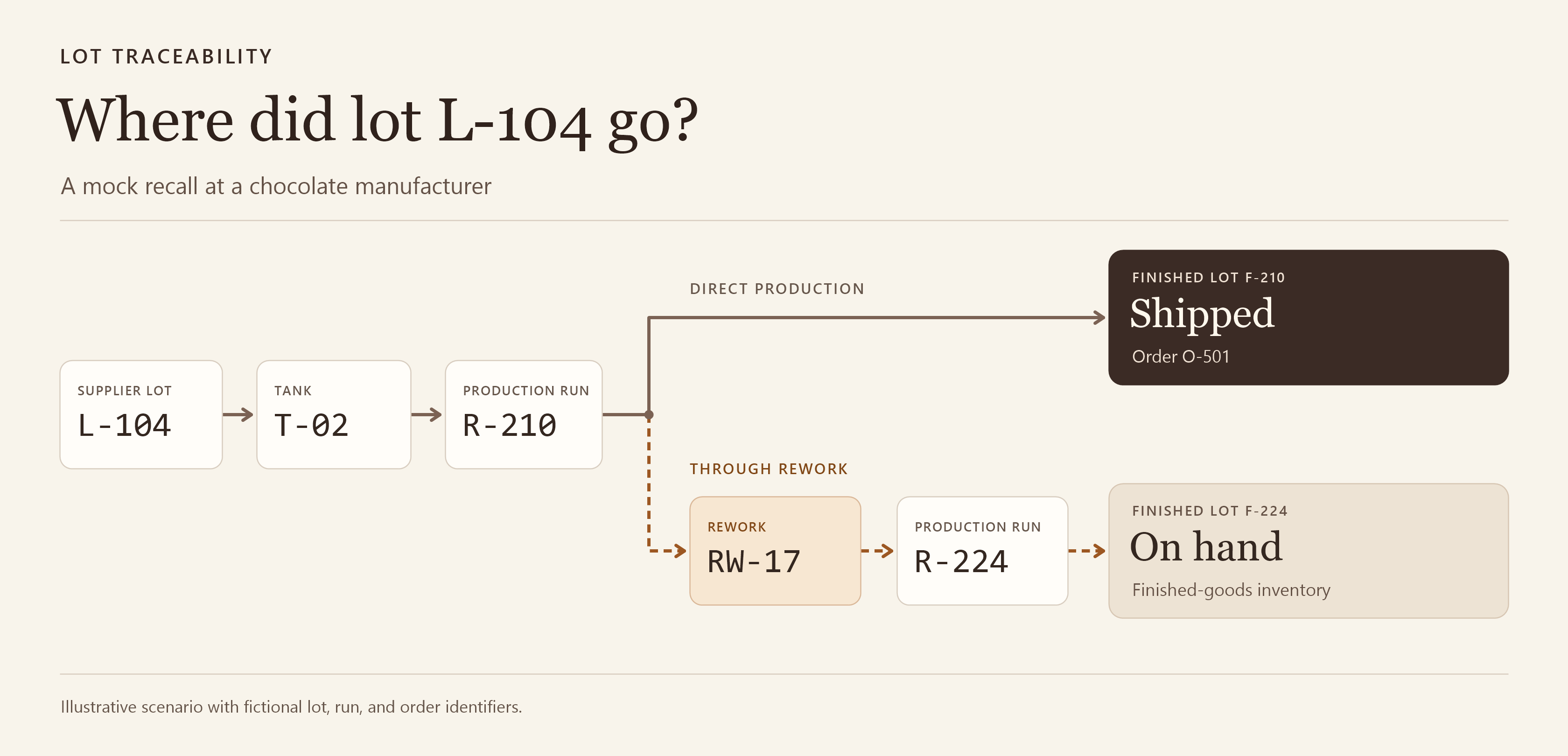
Supplier lot L-104 went into tank T-02, which supplied production run R-210. To determine which runs could have used the lot, I’d check when it entered the tank, when production drew from the tank, and whether any chocolate remained when another lot was added. If the records leave that overlap uncertain, I’d keep the potentially affected runs in scope while QA investigates.
Run R-210 produced finished lot F-210, which shipped on order O-501. It also produced rework RW-17, which was weighed, identified, and later added to run R-224. Finished lot F-224 from that second run is still on hand.
The system records the rework identifier and weight alongside the originating and receiving runs. That record lets QA follow the chocolate into a run that never drew directly from the tank.
Starting with L-104, I’d trace forward to find the on-hand lot QA should put on hold and the shipped order that needs review. Then I’d start with finished lot F-224 and work backward through the rework record to run R-210 and the original supplier lot.
The reverse check matters because someone investigating F-224 may have no idea rework was involved. The records should let them discover that connection for themselves.
The Safe Quality Food (SQF) Code calls for tracing finished product forward to customers, tracing inputs back to suppliers, and maintaining traceability through rework. In a mock recall like this one, I’d document the records QA used so someone else could repeat the trace. SQF Food Manufacturing Code
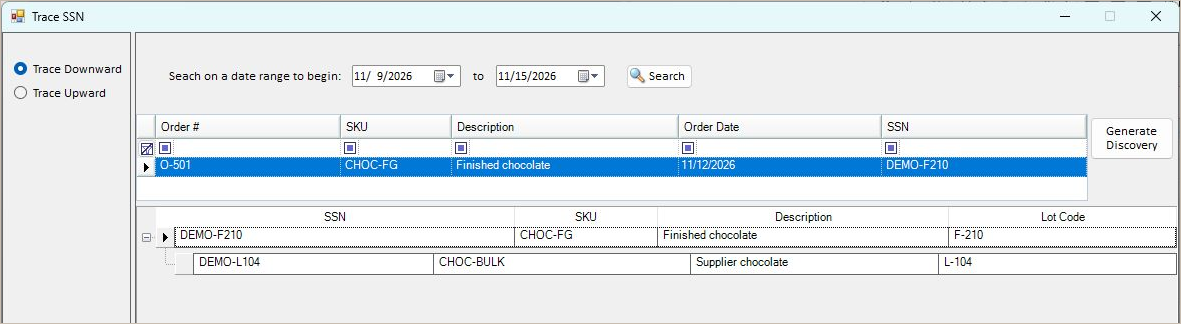
Demo trace from order O-501 and finished lot F-210 back to supplier lot L-104.
The rework entry screen is built for touchscreen monitors on the production floor. Large buttons and text boxes make it easier for operators to tap the right field and enter the rework ID and weight.
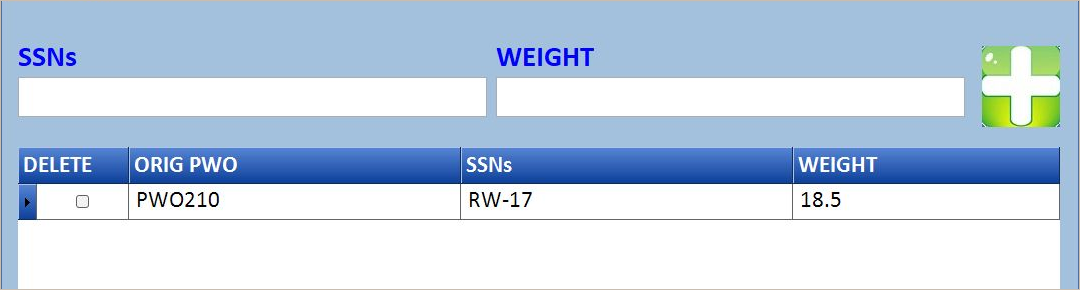
Demo entry for receiving run R-224. The row shows the originating work order PWO210, rework RW-17, and an illustrative weight of 18.5 lb.
A case study at a chocolate manufacturer
At a chocolate manufacturer, each finished good in this workflow has a serial sequence number (SSN). I use that number to help quality assurance (QA) connect a specific case to the bill of materials and the production records that show what went into it.
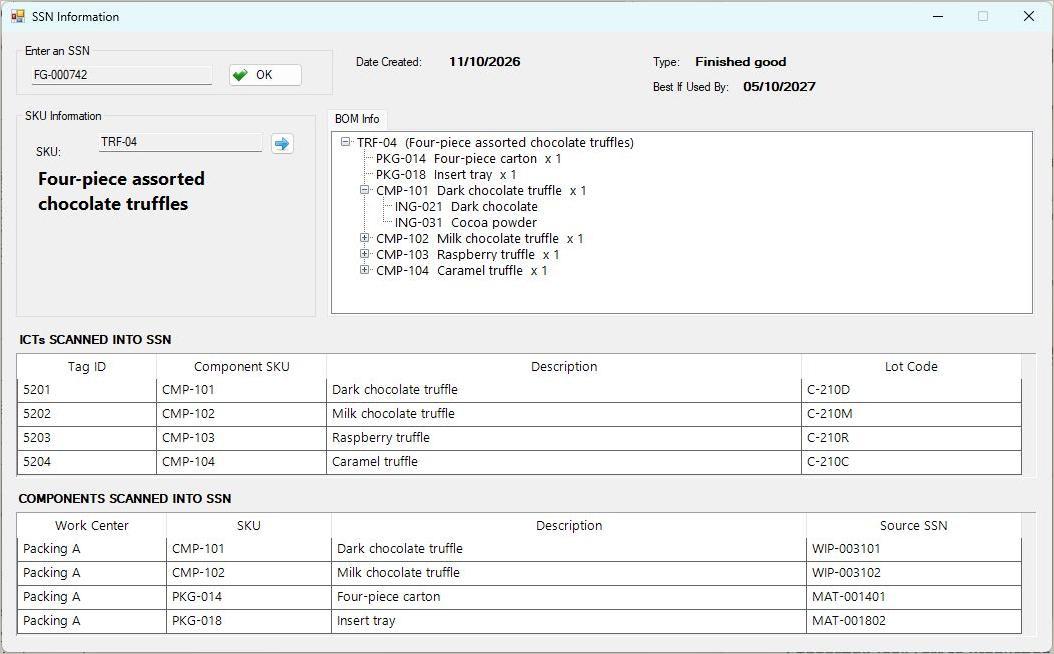
Offline demo of the SSN Information screen for a four-piece truffle assortment. All product details and identifiers shown are fictional.
The bill of materials (BOM) shows the expected build, from the carton and tray to the ingredients in each truffle. The lookup also shows inventory control tags (ICTs) linked to the SSN and components scanned against its production run. QA can open a linked tag or component SSN to follow the material records.
In this mock recall, a supplier flags dark chocolate lot L-104. I’d start with the label on one finished case and work backward to see which component links it to that ingredient lot.
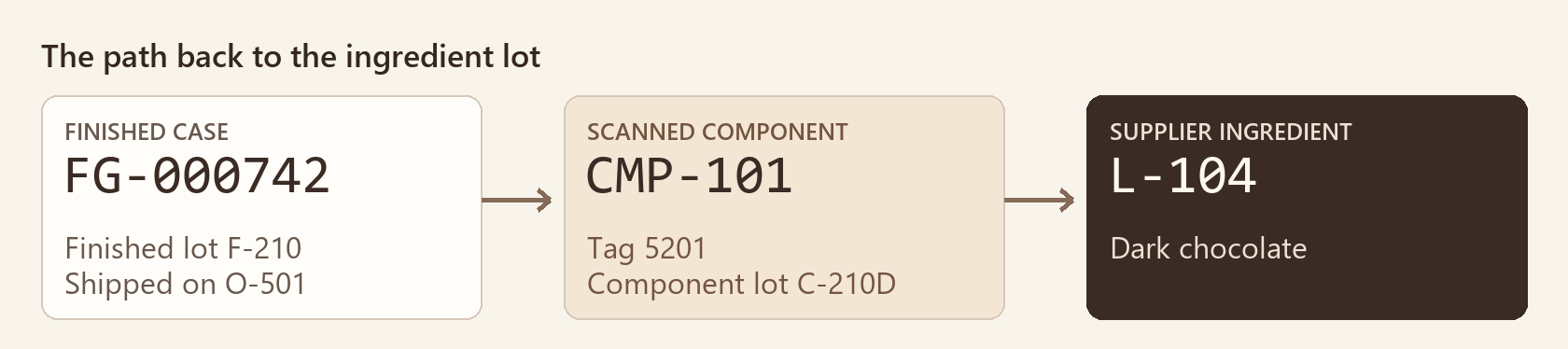
Illustrative trace for the dark chocolate truffle in the assortment.
Look up FG-000742. In the exercise, the SSN identifies a case of SKU TRF-04 from finished lot F-210, which shipped on order O-501. Expand the BOM to find the dark chocolate truffle, CMP-101, and see which ingredients belong in that component.
The scanned tag row ties CMP-101 to tag 5201 and component lot C-210D. The component scan also shows source SSN WIP-003101. Those identifiers give QA a way to open the component records behind the finished case.
Follow the component’s production records to the dark chocolate it used, then check the receiving record for the supplier lot. In this exercise, those records lead to L-104. I’d save the records behind each link so another reviewer could reproduce the trace.
When a component scan identifies the production run, I treat it as evidence for that run. If QA needs to narrow a hold or recall further, the records have to support which finished cases are affected.
QA can start with the SSN on the case and assemble the records needed to decide what to hold. Production can verify which components were recorded against the run, and warehouse staff can use the finished lot and order records to check what is on hand and what has shipped.
For the company, that common starting point can shorten the search for records during a recall, audit, or customer inquiry. It also gives the team a documented basis for the scope of a hold and a trace another reviewer can repeat.
A case study at a chocolate manufacturer
At a chocolate manufacturer, I want the shipping team to catch a wrong carton or a shelf-life exception while the product is still at the station. Scanning the carton’s serial sequence number (SSN) lets the operator check the product against the order before creating a carrier label.
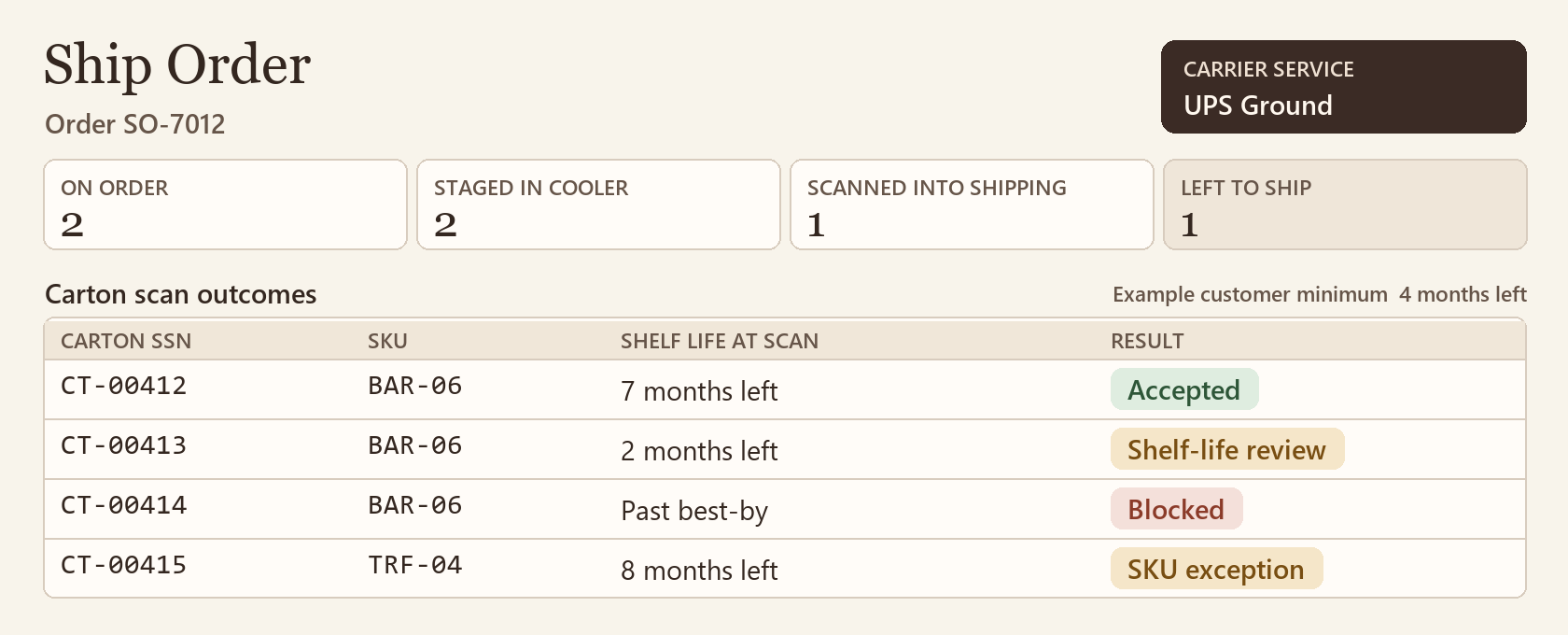
Illustrative shipping view. The rows show four possible scan outcomes for the same fictional order.
Check the item against the order. The scan looks up the carton’s SKU and checks it against the order, including bundled items and configured replacements. A SKU that fails the check requires a supervisor override in the standard order workflow.
Stop expired product. The form uses the carton’s remaining shelf-life value to stop a scan it classifies as expired.
Check the customer’s shelf-life minimum. A customer may require a minimum number of months before best-by. This example uses four months, so a carton with two months left illustrates an exception. The form evaluates remaining shelf life as a percentage against an allowed minimum. A below-minimum scan can prompt supervisor review and create an exception record.
Once the cartons are checked, the operator confirms how they’ll be packed and shipped. The order, carton scans, packages, and carrier tracking records stay connected for later review.
The shipping station supports UPS and FedEx service selection, address validation, and rate quotes. It sends the shipment to the selected carrier, prints the carrier labels, and records tracking numbers. Operators can reopen shipment history to look up tracking or reprint a label. The station also supports drop shipments and third-party billing where configured.
A repeat scan into the same shipment is rejected. A prior scan into another shipment or order prompts the operator to review the conflict. The station shows the quantities ordered, staged in the cooler, scanned for shipping, and left to ship. If the scan count falls below or exceeds the staged count, the order can prompt for confirmation and record the decision in its history.
Operators can use one label per carton or combine multiple cartons under one label. A connected scale and dimensioner can supply package weight and dimensions. Before processing, the form validates package measurements and checks whether required insulation and the insulation type have been recorded.
Shipping staff can resolve carton and quantity discrepancies while the product is still at the station. QA can review recorded shelf-life and wrong-SKU exceptions. Customer service can retrieve the shipment and tracking details when a customer asks where an order is.
For the company, that can reduce avoidable mis-shipments and short-dated deliveries. It also gives the team an order-level record of what left the plant and which exceptions were approved.
For a global logistics and supply chain services provider, I built a purchase order import workflow that reads PDF documents with AI and creates order records inside the existing operations application. Staff select the client and project, upload the documents, and can then review and correct the resulting orders using the familiar editing screens.
Not all customers can send purchase orders electronically in a format the operations application can import directly. Their orders still need to be entered into the system. A purchase order can contain pages of descriptions, part numbers, quantities, units, and prices. Those details need to become usable order records. Entering them one line at a time means copying information that already exists in a document, while also keeping each item associated with the right client and project.
I focused on connecting document reading to the operational workflow, so the extracted information could become editable purchase orders rather than a separate report someone still had to retype.
The user first selects a client and project, then chooses one or more files. For PDF purchase orders, the application converts each page into an image and sends it to an AI model for structured extraction. This approach reads the page visually instead of relying on a fixed set of supplier-specific coordinates.
The import creates the purchase order with its number and date, linked to the selected client and project. It creates line items for descriptions, vendor item numbers, quantities, unit prices, and line totals when those values are available. Common unit abbreviations are matched to the application's unit list, including EA to EACH, CS to CASE, and PK or PAC to PACK.
Demo Client A / Demo Project 01 · March 12, 2026
| Line | Vendor item | Description | Qty | Unit | Unit price | Line total |
|---|---|---|---|---|---|---|
| 1 | DEMO-210 | Mounting bracket | 12 | EACH | $18.00 | $216.00 |
| 2 | DEMO-210 | Mounting bracket | 4 | EACH | $18.00 | $72.00 |
| 3 | DEMO-330 | Service kit | 2 | PACK | $45.00 | $90.00 |
Illustrative records, not an application screenshot or live AI output. The repeated item remains two separate lines. EA maps to EACH; PK maps to PACK.
Long orders are processed one page at a time, and their extracted line items are combined in page order. Repeated products remain separate lines because the same part number can legitimately appear more than once. The extraction instructions also call for zero-price items, freight, surcharges, and labor to be retained when they appear as line items.
The application checks that each AI response completed and can be read as structured data. It rejects an extraction with no line items. When every extracted item includes a printed line number, it also checks that the numbers advance consecutively and rejects gaps or repetitions. These checks help catch specific extraction failures before the order is created; they do not verify every value on the document.
A successful import saves the purchase order and its line items directly. Staff can then open the order, review the information, and edit, add, copy, or delete line items through the existing screens. There is no separate approval step before the import saves.
Review remains important. For example, the current import defaults a missing quantity to one, and an unrecognized unit may remain unset. AI prepares the records, while staff can check them against the source document and make corrections.
The delivered workflow provides a path from a purchase order PDF to structured records in the application where the team already works. It replaces the need to manually type each supported field on successfully imported orders and keeps the client and project selection explicit.
The value is a practical connection between AI document reading and everyday operations: upload a document, create usable records, and keep those records available for staff to maintain. It is an approach suited to businesses whose employees repeatedly transfer information from incoming documents into internal systems.
All example names, identifiers, items, and amounts are fictional. The example illustrates the workflow, not a live extraction result or measured client performance.
For a global logistics and supply chain services provider, I built a shipment attention queue and preparation checklist inside the existing operations application. The workflow brings approaching deadlines, overdue milestones, recorded delay flags, and missing preparation items into a view that links staff to the shipment records they need to review.
A shipment record can contain booking details, cargo information, documents, and estimated and actual movement dates. Having those details available does not automatically tell an employee which shipment needs attention first.
The practical challenge was to turn saved information into a useful starting point for daily follow-up: what needs review, which record it belongs to, and where to go next.
The Needs attention view evaluates saved records for open shipments within the user's access scope. It highlights recorded delay flags and checks supported milestone dates against the user's local calendar date. A deadline before today is overdue; today through the next three days is due soon when the corresponding actual date is missing.
Users can select overdue or delayed shipments, due-soon items, or preparation issues, then narrow the results by category or search by shipment, client, owner, or issue. Matching issues are grouped into one row per shipment, with the project manager shown as owner and a link to the shipment editing screen.
| Priority | Shipment | Needs attention | Saved date |
|---|---|---|---|
| Urgent | DEMO-SHP-204 | Departure overdue | Mar 11, 2026 |
| Due soon | DEMO-SHP-205 | Arrival due within 3 days | Mar 14, 2026 |
| Preparation | DEMO-SHP-206 | Packing list missing | Not entered |
Fictional review as of March 12, 2026, with all attention groups selected. Illustrative records, not an application screenshot or live system output.
In the fictional example, DEMO-SHP-204 has a saved departure estimate of March 11 and no actual departure date. Viewed on March 12, it receives a departure-overdue prompt. That tells the employee to investigate whether the movement is late or the record needs updating. It does not establish what physically happened.
The employee opens the shipment from the queue and reviews the saved details. For pre-departure preparation, the readiness panel shows completed and missing checks, offers a missing-items-only view, and provides Review buttons that lead to the relevant form sections.
The checklist covers client and project selection, project manager assignment, transport and booking details, cargo quantities and weight, and applicable uploaded documents. Additional checks depend on the shipment, such as pivot details for an air movement or instructions for temperature-controlled or dangerous goods.
Document checks confirm that the relevant uploaded file is available; they do not approve its contents. The panel can reflect current form values, while the attention queue uses saved data. Staff save changes and refresh the queue to review the updated result.
Estimated dates, recorded actual dates, and administrative closure have different meanings. The attention rules stop prompting for a completed milestone when its corresponding actual date is present. This queue excludes closed records and records with an actual delivery date; closing a file is not evidence that delivery occurred.
The workflow provides prompts from the information available. Missing dates do not become invented deadlines, and an overdue estimate is not a contractual on-time performance measure. Staff remain responsible for investigating and updating the shipment.
The delivered workflow connects issue identification to the screens where staff can act. Instead of opening every shipment to look for the same preparation gaps or approaching dates, employees have a filtered starting point with an explicit reason for follow-up.
The business gains a repeatable way to review priorities, identify missing preparation information, and maintain shipment records. The work demonstrates how operational rules and clear navigation can make existing data more useful in daily decision-making.
All example identifiers and dates are fictional. The examples illustrate implemented workflow rules, not measured client performance.
Data entry portals, dashboards, shipment tracking and reporting: practical applications shaped around the way a business works.


An experienced software developer focused on C#, VB.NET, SQL and business systems. Work directly with the engineer responsible for understanding your application and delivering the improvements.
Tell Jonathan about your application, integration challenge or backlog. Together, identify a practical next step.
